Visit Time2Justice
Open the Time2Justice website and log in to your account.
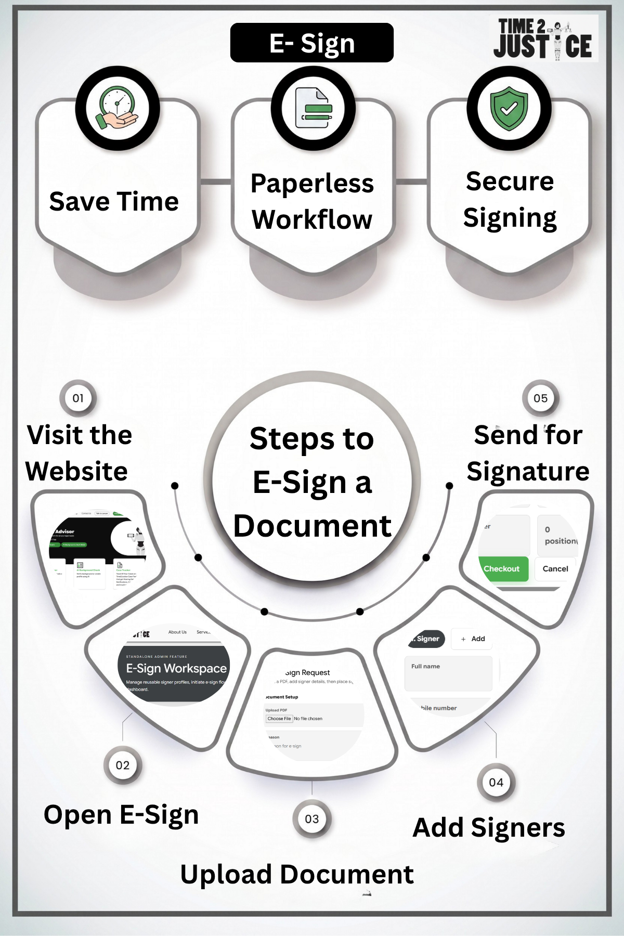
Sign, send, track, and manage electronic signatures for contracts, agreements, notices, vendor documents, and other important legal paperwork.
In today's digital world, signing documents should be fast, secure, and legally reliable. Whether you're signing employment contracts, rental agreements, business contracts, legal notices, vendor agreements, or other important documents, electronic signatures eliminate the need for printing, scanning, and physical paperwork.
Time2Justice E-Sign enables individuals and businesses to sign documents electronically from anywhere, at any time. Designed to simplify document execution, our platform offers a secure, paperless, and efficient signing experience, helping users complete agreements quickly and professionally.
Whether you're sending a document for signature or signing one yourself, Time2Justice streamlines the entire process through an intuitive workflow, secure authentication, and seamless document management. Time2Justice is part of a broader AI-powered legal platform that helps users draft, review, compare, and manage legal documents from a single place.
With Time2Justice E-Sign, documents can move from draft to signed execution faster and with less administrative friction.
Sign documents securely from anywhere, on any device.
Eliminate the need for printing, scanning, and couriering documents.
Speed up contract approvals and agreement execution.
Reduce paperwork, administrative effort, and operational costs.
Track the signing process in real time.
Improve document security and minimise the risk of document tampering.
Store signed documents digitally for quick access and future reference.
Provide a seamless signing experience for clients, employees, vendors, and business partners.
Complete agreements in minutes instead of days.
Support a secure, paperless, and environmentally friendly workflow.
Upload your document, add the signers, place the signature fields, and complete the signing process online.
Open the Time2Justice website and log in to your account.
Navigate to the E-Sign service from the dashboard or Services menu.
Upload the document that requires one or more signatures.
Enter the details of each signer, including their name and email address.
Mark the locations where each signer needs to sign or add other required fields such as date or initials.
Review the document and send it securely to all designated signers.
Recipients receive the document, review its contents, and sign it electronically from any device.
Once all parties have signed, the completed document is available for download and secure storage.
Use Time2Justice E-Sign to complete document execution securely, professionally, and without paper-heavy follow-ups.