Sign up
Time2Justice Light LogoTime2Justice Dark Logo
About Us
All Services
View Legal Query SolverWith AIWith Internet
View DocumentDraft DocumentCompare DocumentsQuery On DocumentsReply On DocumentSummarize DocumentE-Sign Documents
View SearchSearch Bare ActsSearch Specific SectionSearch CircularsSearch NotificationsSearch GazetteSearch JudgementsSearch Lawyers
View Background VerificationProfiling And VerificationOnly ProfilingOnly Verification
View AI Judge and AI ArbitrationAI JudgeAI Arbitration
Pricing
Contact Us
Log in
Talk to Lawyer
Sign up
Log in
Time2Justice
Time2Justice is an AI powered legal assistance website.
ServicesLegal Query SolverDraft DocumentAI Background CheckLawyersXML to PDF
SupportContact usHelp & FAQRefund PolicyDownload AppParent Company
LegalPrivacy PoliciesTerms of ServiceDisclaimer
ResourcesBare ActsBlogsTemplatesSeminarsTop Legal Queries in India
© Copyright 2026 Time2Justice AI Private Limited. All rights reserved.
How PDF Comparison Works: Text, Visual & | Time2Justice
  1. Home
  2. Blogs
  3. How PDF Comparison Works: Text, Visual & Structural Differences

How PDF Comparison Works: Text, Visual & Structural Differences

Neeraj Gutgutia
Neeraj Gutgutia• August 17, 2026 LinkedIn
Finance leader with 25+ years of experience across banking, infrastructure, and enterprise strategy.
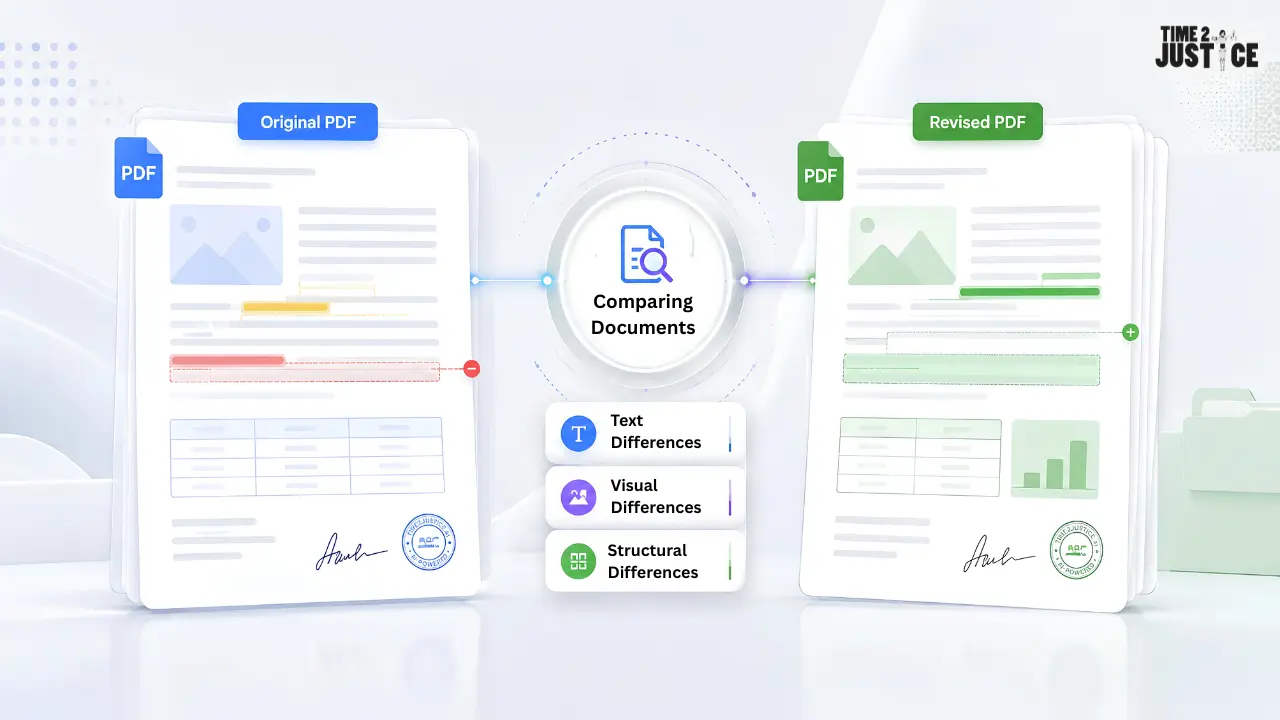
PDF comparison showing original and revised documents with text, visual and structural differences highlighted

Table of Contents

  • What Is PDF Comparison?
  • How PDF Comparison Works
  • Types of Differences PDF Comparison Can Detect
  • How PDF Comparison Handles Different Document Types
  • Why PDF Comparison Is Useful for Legal and Business Documents
  • Common Limitations of PDF Comparison
  • How AI Improves PDF Comparison
  • How Time2Justice Helps Compare Documents
  • Frequently Asked Questions

PDFs are widely used for contracts, reports, invoices, policies, proposals, and other important business documents. When a document is revised, however, finding exactly what changed between two PDF versions can be difficult.

Opening two files side by side may work for a short document, but reviewing dozens or hundreds of pages manually can be time-consuming. Changes may involve a single number, an entire paragraph, an image, a signature, or even the structure of the document.

This is where PDF comparison becomes useful. A PDF comparison system analyzes two document versions and identifies differences between them. Depending on the technology used, it may compare text, page structure, formatting, images, and other visual elements. Modern comparison tools can combine text-based and visual approaches to give reviewers a clearer picture of what changed.

In this guide, you'll learn how PDF comparison works, what types of differences it can detect, how text and visual comparison differ, how scanned PDFs are handled and how AI can improve the comparison process.

What Is PDF Comparison?

PDF comparison is the process of analyzing two PDF documents to identify differences between them.

The documents are typically treated as:

  • Original version — the earlier document

  • Revised version — the updated document

A comparison system may identify changes such as:

  • Added or deleted text
  • Modified wording
  • Changed numbers or dates
  • Added or removed pages
  • Formatting changes
  • Image changes
  • Layout changes
  • Structural changes

The exact differences detected depend on the comparison technology. Some tools focus mainly on text, while others can compare text, images, graphics, formatting, annotations and page appearance.

The purpose is not simply to show that two files are different. A useful comparison helps reviewers locate and understand where those differences occur.

How PDF Comparison Works

Although different PDF comparison tools use different technologies, the overall process generally involves several stages.

Extracting Document Content

The first step is to analyze the contents of both PDFs.

For a digital PDF, the system can usually work with the document's machine-readable text layer. It may also analyze information about page elements, images, graphics and positioning.

This matters because a PDF is more than a simple text document. A page can contain text alongside images, tables, graphics, headers, footers and other elements. A comparison system therefore needs to process the contents of both documents before determining what has changed.

Neeraj Gutgutia

About the Author

Neeraj Gutgutia

Co-founder, Time2Justice.ai

Neeraj Gutgutia is a Chartered Accountant and holds an MBA from IIM Indore. He has more than 25 years of experience working with companies like Reliance Industries, ICICI Bank, Hiranandani Group, and Right2Vote.

Follow on LinkedIn

Related Posts

How to Compare Scanned PDFs: OCR, Visual Comparison & Best Practices
August 12, 2026
AI Contract Comparison: Benefits, Process & Best Practices
August 10, 2026
Compare Contract Versions: Step-by-Step Guide
August 5, 2026

If the PDF is scanned and contains only page images, text extraction may require OCR first. In that situation, the comparison process can become a combination of OCR, text analysis and visual comparison.

Matching Pages or Sections

After analyzing the documents, the system needs to determine which parts of the two versions correspond to each other.

For simple documents, page 5 of the original may correspond directly to page 5 of the revised version.

However, this becomes more complicated when:

  • A page has been added
  • A page has been removed
  • Sections have been rearranged
  • Content has moved to another page
  • Page breaks have changed

If a comparison system simply compares every page by position, adding one page near the beginning can make many later pages appear different even when their content has not changed.

More advanced comparison approaches attempt to match similar content or page structures so that changes can be interpreted more accurately. Research into document comparison also explores structural and layout-based matching to handle content that has been moved, merged, or split.

Comparing Text

Once corresponding content has been identified, the system can compare the text.

Text comparison can identify:

  • Added words
  • Deleted words
  • Modified sentences
  • Changed numbers
  • Updated dates
  • Revised clauses
  • Missing paragraphs

For example:

Original:

Payment must be completed within 30 days.

Revised:

Payment must be completed within 45 days.

A text comparison system can identify the change from 30 to 45.

This type of comparison is particularly useful for contracts, policies, agreements and reports where a small wording change can have an important effect.

Many PDF comparison tools specifically provide text-difference highlighting so users can locate additions, deletions, and modified content without reading both versions from beginning to end.

Detecting Visual Differences

Text comparison is only one part of PDF comparison.

Two PDFs can contain the same words while still looking different.

For example, a revised document may contain:

  • A different font size
  • A moved image
  • A new logo
  • A changed signature
  • A different page layout
  • A modified chart
  • A new watermark

Visual comparison analyzes how the pages appear rather than relying only on extracted text.

A common approach is to render the pages and compare their visual representations. Differences can then be highlighted so the reviewer can see where the pages have changed.

This is particularly useful when appearance matters as much as wording. Adobe Acrobat, for example, provides comparison options for text, images, graphics, formatting, annotations, headers and footers and backgrounds.

Identifying Structural Changes

PDF comparison can also involve changes to the organization of a document.

Structural differences may include:

  • Pages being added or removed
  • Sections being moved
  • Paragraphs being rearranged
  • Tables being modified
  • Headers or footers changing
  • Content being split across pages

Consider a contract clause that moves from Section 4 to Section 6 without significant changes to its wording. A basic comparison may show the content as deleted from one location and added to another.

A more sophisticated comparison process can attempt to recognize that the content has been relocated rather than completely rewritten

This makes the results easier to interpret and can reduce confusion when documents have undergone substantial structural changes.

Types of Differences PDF Comparison Can Detect


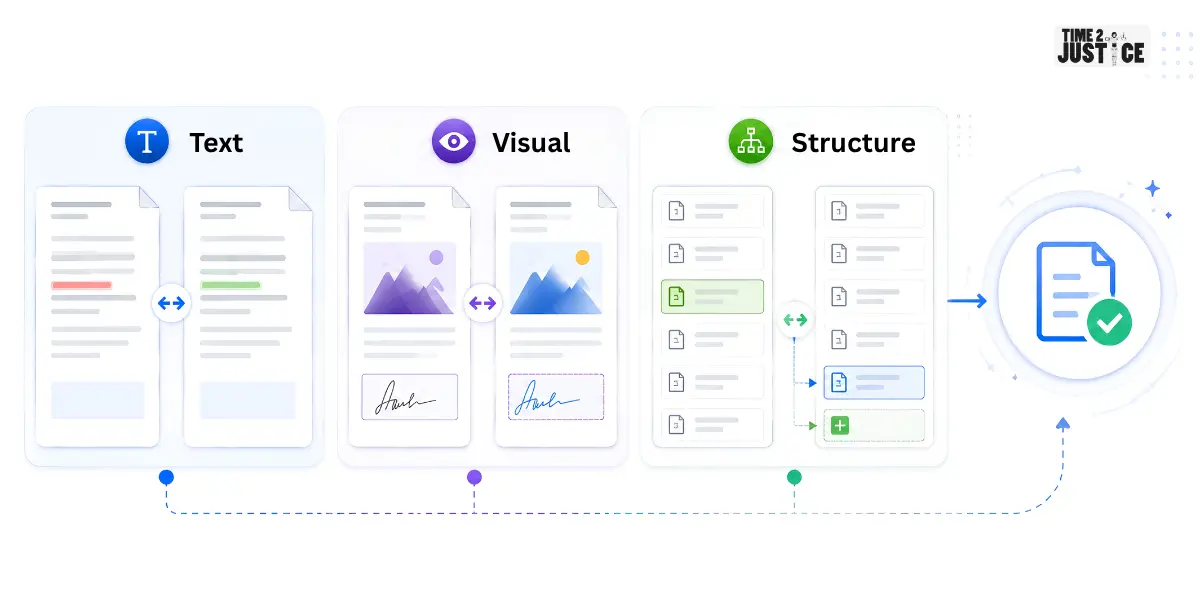
Image

Depending on the technology used, PDF comparison can identify several categories of differences.

Text Differences

These include:

  • Added or deleted words
  • Changed sentences
  • Modified numbers
  • Revised dates
  • Changed clauses Text differences are especially important when reviewing legal and business documents.

Formatting Differences

Formatting changes may include:

  • Font changes
  • Font size
  • Bold or italic formatting
  • Paragraph spacing
  • Alignment
  • Headers and footers
  • Visual Differences
  • Visual comparison can identify:
  • Images
  • Charts
  • Logos
  • Signatures
  • Stamps
  • Watermarks
  • Page appearance

Structural Differences

Structural differences may include:

  • Added or removed pages
  • Reordered sections
  • Moved paragraphs
  • Modified tables
  • Changed page breaks

Some tools combine several of these comparison methods to provide a broader view of document changes.

Text Comparison vs Visual Comparison

Text and visual comparison serve different purposes.

MethodBest ForMain Limitation
Text comparisonWording and clause changesMay miss purely visual changes
Visual comparisonLayout, images, and page appearanceMay not explain the exact wording change
Combined comparisonComprehensive document reviewCan require additional processing and review

For example, if a contract's payment amount changes from ₹50,000 to ₹60,000, text comparison makes the change easy to identify.

For example, if a contract's payment amount changes from ₹50,000 to ₹60,000, text comparison makes the change easy to identify.

However, if a signature image is replaced while the written content remains unchanged, visual comparison may be more useful.

For documents where both content and appearance matter, combining the approaches can provide better coverage.

How PDF Comparison Handles Different Document Types

Not every PDF can be compared in exactly the same way.

Digital PDFs

Digital PDFs usually contain a machine-readable text layer, making them well suited to text-based comparison.

Examples include PDFs exported from:

  • Microsoft Word
  • Google Docs
  • Accounting software
  • Business applications
  • Other document-creation tools

These files can generally be analyzed without first converting page images into text.

Scanned PDFs

Scanned PDFs may contain images rather than selectable text.

In these cases, OCR may be required before text-based comparison can work effectively. OCR converts text appearing in page images into machine-readable content.

Visual comparison can also be useful because it can identify page-level differences even when there is no usable text layer.

For a deeper explanation, see our How to Compare Scanned PDFs: OCR, Visual Comparison & Best Practices guide.

Complex PDFs

Some PDFs contain:

  • Multiple columns
  • Tables
  • Footnotes
  • Images
  • Complex formatting
  • Charts
  • Embedded elements

These documents can be more difficult to compare because extracted text may not always follow the same reading order as the visible page.

For complex documents, using both content and visual analysis can provide a more reliable understanding of the differences.

Why PDF Comparison Is Useful for Legal and Business Documents

PDF comparison becomes particularly valuable when documents go through multiple revisions.

Contract Review

Legal teams can compare contract drafts to identify changes in:

  • Payment terms
  • Liability
  • Confidentiality
  • Termination clauses
  • Contractual obligations
  • Compliance Documents

Organizations can compare different versions of policies, procedures, and compliance documents to identify revisions.

Financial Documents

PDF comparison can help identify changes in:

  • Amounts
  • Dates
  • Tables
  • Financial figures
  • Reported information

Business Proposals

Teams can compare revised proposals to determine whether pricing, scope, timelines, or other terms have changed.

Instead of manually checking every page, reviewers can focus on areas where the comparison identifies differences.

Common Limitations of PDF Comparison

PDF comparison can save time, but it is not perfect.

Scanned Documents

Image-based PDFs may require OCR before text can be compared effectively.

OCR Errors

OCR can incorrectly recognize characters, numbers, or words, especially when scans are low quality.

Formatting Changes

A text-only comparison may not detect every visual formatting change.

Complex Layouts

Multi-column documents, tables, and unusual layouts can make text extraction more difficult.

Reordered Content

A simple comparison may interpret moved content as deleted and re-added content instead of recognizing it as a relocation.

These limitations are important when interpreting comparison results. A detected difference does not automatically mean that the underlying document has been intentionally revised.

How AI Improves PDF Comparison

AI can make document comparison more useful by helping systems analyze content and context rather than relying only on direct word matching.

Depending on the system, AI can help identify:

  • Related clauses
  • Contextual changes
  • Reorganized content
  • Similar sections
  • Meaningful revisions

For example, two clauses may express a similar obligation using different wording. A basic text comparison can show many individual word changes, while AI-assisted analysis may help reviewers understand that the underlying provision has been substantially rewritten.

AI can also help organize large numbers of detected differences so reviewers can focus on the revisions that are most relevant to the document being reviewed.

This can be particularly useful when working with lengthy contracts, compliance documents, or business agreements.

AI should be treated as a comparison and review aid rather than the final decision-maker. Important changes still need to be evaluated carefully before a document is approved or finalized.

How Time2Justice Helps Compare Documents

If you regularly compare legal or business documents, Time2Justice's Compare Documents feature can help identify differences between supported document versions.

The feature supports PDF, DOC, DOCX, PPTX, and TXT files and is designed to help users identify document changes more efficiently.

It can be useful for reviewing:

  • Contracts
  • Agreements
  • Legal documents
  • Business records
  • Compliance documents
  • Other document versions

Instead of manually checking every page, users can use document comparison to locate revisions and focus their attention on the areas that have changed.

Time2Justice also provides other document-analysis capabilities that can support the broader review process. Summarise Document can help users understand lengthy documents, while Query on Document can help locate specific clauses, obligations, dates, or other information.

This creates a broader workflow:

Understand → Compare → Identify Changes → Review

Final Thoughts

PDF comparison is more than checking whether two files contain different words. A comprehensive comparison can involve text extraction, page matching, visual analysis, and structural comparison.

Text comparison is useful for identifying wording and clause changes, while visual comparison can reveal differences in images, signatures, formatting, and page layout. For scanned PDFs, OCR may be necessary before meaningful text comparison can take place.

Understanding these processes can help you choose the right comparison approach for different types of documents. Whether you're reviewing contracts, reports, policies, or business records, knowing how PDF comparison works can make document review more structured and efficient.

If you want to learn the practical steps for comparing PDF files online, read our How to Compare Two PDF Files Online guide.

Frequently Asked Questions

How does PDF comparison work?

PDF comparison analyzes two documents to identify differences in text, visual elements, page structure, and other document properties.

What can a PDF comparison tool detect?

It can detect text changes, formatting differences, image changes, added or removed pages, and structural changes.

Can PDF comparison detect visual changes?

Yes. Visual comparison can identify changes in page layout, images, graphics, signatures and other visual elements.

Can scanned PDFs be compared?

Yes. Scanned PDFs may require OCR to make their text searchable. Visual comparison can also help identify page-level changes.

Is PDF comparison the same as comparing Word documents?

No. PDFs focus on preserving document appearance, while Word files contain more structured editable content. PDF comparison may therefore require additional text and visual analysis.

Can AI improve PDF comparison?

Yes. AI can help identify contextual and structural changes and organize differences more meaningfully than basic text matching.

AI powered legal platform for all your legal needs

Try Time2Justice for Free

Ask a Legal QueryAI Background Check

AI powered legal platform for all your legal needs

Try Time2Justice for Free

Ask a Legal QueryAI Background Check